Showing posts with label Whatsapp. Show all posts

Friday, January 13, 2017

New Whatsapp Backdoor shows why your Messages Might not be safe


Whatsapp is secure, or at least that's what we thought until a new revelation came to light which showed that the Facebook-owned chat medium has a security backdoor that can allow Mark Zuckerberg's staff to intercept and read encrypted WhatsApp messages.


According to the Guardian, Tobias Boelter, a cryptography and security researcher at the University of California, Berkeley, said that due to the way WhatsApp has implemented its end-to-end encryption protocol, Facebook can intercept and read users’ messages.

This was in an article which went on to explain how Whatsapp works in terms of security. The report said that WhatsApp’s encryption relies on the "generation of unique security keys," which are traded and verified between users to ensure that communications are secure and cannot be intercepted.

READ: HOW TO GET WHATSAPP VIDEO CALL ON YOUR ANDROID

Facebook, it has been revealed, can resend undelivered messages with a new security key, effectively allowing the company to access the 'encrypted' messages without the sender or recipient being aware or able to prevent it from happening. (The sender is alerted after the fact if they have opted into encryption warnings.)

This is of course a big issue in terms of Freedom of speech with the possibility of spying a huge fear here.

According to Boelter, "If WhatsApp is asked by a government agency to disclose its messaging records, it can effectively grant access due to the change in keys," 


The report has been made available to Facebook but nothing has been said yet, so we have no idea what will happen moving forward, but if nothing is done, then one will have to be very careful of their activity on WhatsApp, because you never know who's reading.

Wednesday, November 23, 2016

Whatsapp have rolled out Yet another Feature, Find out how it works

photo crd: BGR


WhatsApp have been rather prolific in bringing in new features recently. Just last week, they launched their video calling feature and now WhatsApp has introduced yet another video related feature. 
What this feature does is let you watch a shared video while it is being downloaded to your phone. At the moment the feature is only available on WhatsApp beta version 2.16.365.
Before now when a video was shared, you had one of two options; either get a download button or automatically download depending on your phone settings. In both situations, however, you could only watch the video once the download is completed. 

Well no more, what happens now is instead of a download button, you see a play button. When you tap the button, the video will start buffering, and you will be able to watch the video while it is being downloaded on your phone. The buffering feature is similar to what you see when watching videos online. 
While It's not the most groundbreaking feature in the world, it does save you time. To use this feature, you will have to download the latest WhatsAppbeta app that you can get on the Play Store. You will however have to first enroll in the company’s beta program. It is likely that WhatsApp would release this feature on the final version soon.
So get on it and save yourself the time you would normally use waiting for a video to download

Wednesday, November 16, 2016

How to Get Whatsapp Video Calling On your phone

Photo Crd: CNN Money
 

WhatsApp video calling is now a thing, yes Whatsapp have now joined the likes of Skype and Facetime with their own video calling feature. It was launched on Tuesday and if you update your Whatsapp you should be able to get it. It is being provided for Android, iPhone, and Windows users. 


Normally all you need to do is update the feature to make your first video call, it could happen though that your iOS or Android device is not set to receive automatic updates, or you are not sure if WhatsApp has been updated, if this is the case, all you have to do is visit the App Store or Google Play and check for available updates.  


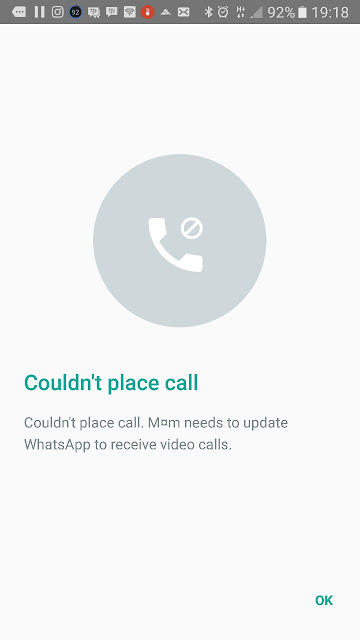
If for some reason you don't see the video calling option, or if WhatsApp video calling is not working, or...(groan) WhatsApp video calls are giving you an error message you can take matters into your hands by downloading the WhatsApp beta version APK to see if things work any better.


Below are the steps to getting Whatsapp Video calling on your phone 


  • Open Google Play and search for WhatsApp 
  • Open WhatsApp's Google Play listing 
  • Scroll dow towards the bottom of the page 
  • In the section that says Become a beta tester tap on I'M IN 
  • Confirm on the next screen and wait for a few minutes 
  • Come back to WhatsApp listing page on Google Play 
  • You should see an option to Update WhatsApp to beta version 
  • Update the app 


If that doesn't work for you or you'd rather go another way, you could download the WhatsApp APK that comes with support for video calling (v2.16.354) from a website like APK Mirror or APK Pure. 

Please note that going this route means you know what you're doing if not it'll be better to just wait till the update gets to your phone. 
 

 With the above you should have no qualms getting whatsapp video calling and start making video calls.

Tuesday, November 15, 2016

Whatsapp Joins In On the Video calling Craze

Photo crd: tech news today


Facebook's WhatsApp has added a new feature to its plethora of features and that is video calling.
In a highly competitive tech space, apps are trying to one up each other with better updates, features and so on and whatsapp is no different.
With Google duo, Skype and other video call apps, it was only a matter of time before the renown app joined the club. 
Whatsapp now implements free video calling.
Photo crd: Androidpit

Users will be able to hold one-on-one video calls in addition to voice calls and texts. 
According to Whatsapp's blog "There’s no substitute for watching your grandchild take her first steps, or seeing your daughter’s face while she’s studying abroad. And we want to make these features available to everyone, not just those who can afford the most expensive new phones or live in countries with the best cellular networks,"
The feature will not allow for more than two users at a time and while that might be a bummer, it makes up for it by be available across various platforms.
WhatsApp has not announced a specific day for release. But we're keeping our fingers crossed it'll be pretty soon.

Friday, November 11, 2016

WhatsApp Plus For Android Download 2016.

WhatsApp Plus Apk Download - Smartfonefreaks.com

Download it here WhatsApp Plus Apk but before you go ahead here's why WhatsApp Messenger is one of the fastest mobile messaging App in the World, in fact it has taking over traditional SMS. We all know the story that Facebook now owns WhatsApp and are steadily working on it to improve it much better but when it comes to customization, WhatsApp inventors aren't down for that, that's why we have WhatsApp Plus

So what is WhatsApp Plus and who created it ?

WhatsApp Plus was developed by a Spanish developer named Rafelete, this genius wasn't ok with the way WhatsApp security is so he decided to modify the Original WhatsApp which now makes his a third party version.

So what's can WhatsApp Plus do ?

Apart from the normal feature from WhatsApp, with WhatsApp Plus you can use custom themes, Send large files to your friends and some other cool stuffs you might wanna check under the hood.

Haven said that, WhatsApp Plus is a good app and you'll enjoy the hidden features it has. Enjoy your privacy even better!


DOWNLOAD WhatsApp Plus APK 

P.S: This is a third party App and you are responsible for the download. We did not claim WhatsApp and WhatsApp Plus are in partnership. They are two different entities but with the same goal.

Sunday, August 14, 2016

Cara membuat quote/kutipan di Whatsapp

Assalamualaikum. Wr.Wb. Bro/Sis

Whatsapp saat ini sudah mendapatkan update berkali-kali, dan setelah lama menggunakan whatsapp, ternyata ada fitur baru yang disematkan, yaitu meng quote sebuah pesan. Apa fungsi quote, yaitu untuk membalas pesan sesuai dengan pertanyaan yang dimaksud.
Oke langsung saja untuk membuat quote adalah sebagai berikut:
1. Cari pesan yang ingin diquote


2. Kemudian tekan dan tahan pada pesan yang ingin diquote


3. Maka nanti akan seperti ini:


4. Jika sudah kirim deh, jadinya begini bentuk quote pesan pada whatsapp.


Selesai deh, ok itu saja langkah untuk membuat "quote" atau kutipan pada whatsapp. Hanya saja sampai pada tulisan ini dibuat, fitur "quote" ini belum bisa multi quote, alias single/satu kutipan saja. Tapi setidaknya sangat membantu untuk membalas pesan secara spesifik.

:D

Friday, June 3, 2016

Cara backup dan restore pesan whatsapp via cloud di Android

Assalamualaikum. Wr.Wb. Bro/Sis
Jika anda memiliki pesan whatsapp yang penting, maka aplikasi whatsapp terbaru memiliki fitur backup dengan metode cloud. Atau menyimpan histori pesan di cloud, atau lebih tepatnya di Google Drive aplikasi penyimpanan cloud milik google.
Backup/Restore Pesan Whatsaap via Google Drive
Buka aplikasi whatsapp, lalu buka setelan.
Backup/Restore Pesan Whatsaap via Google Drive
Kemudian pilih chatting.
Backup/Restore Pesan Whatsaap via Google Drive

Lalu pilih cadangan chat,
Backup/Restore Pesan Whatsaap via Google Drive
Selanjutnya pada bagian akun pilih kontak email yang terintegrasi dengan google drive, kemudian pada bagian "cadangkan lewat" pilih mau lewat wifi atau seluler, lalu pada bagian "sertakan video" centang jika ingin ikut dibackup, akan tetapi lebih baik diabaikan saja, karena pasti akan membutuhkan data internet yang besar.

Jika sudah tekan tombol "Cadangkan", selesai deh. Nah bagaimana untuk merestorenya, untuk merestorenya tidak bisa jika aplikasi whatsapp sudah berjalan. Restorenya hanya berfungsi ketika fresh install whatsapp baru atau di install di perangkat lain.

Ok itu saja bro/Sis. :)

Tuesday, May 19, 2015

Cara memblokir kontak di whatsapp android

Assalamualaikum Wr.Wb. Bro/Sis

Bagi anda yang menggunakan whatsapp dan memiliki banyak kontak, terkadang ada kontak yang tidak diinginkan untuk mengirimi pesan ke anda. Nah bagaimana caranya biar kontak tersebut dapat diblokir di whatsapp. Berikut adalah langkah-langkahnya.


1. Buka Setelan/Settings/Pengaturan pada whatsapp, Lalu pilih "Akun"

2. Kemudian pilih "Privasi"


3. Kemudian scroll ke bagian pesan, pilih "Kontak terblokir: Tak ada"


4. Kemudian pilih icon orang untuk menambahkan.

5. Pilih kontak yang ingin diblokir.

6. Jika sudah nanti dia akan ada di dalam daftar blokir.


Nah selesai, anda dan kontak yang diblokir tidak akan dapat berkomunikasi melalui whatsapp. Tapi, ada tapinya nih, kalau anda dan kontak yang terblokir berada dalam satu grup whatsapp, anda tetap dapat saling berkomunikasi hanya didalam grup whatsapp saja.

Ok itu saja. Bro/Sis..
:D


Thursday, May 14, 2015

Cara membuka Whatsapp di Web

Assalamualaikum.Wr.WB.

Bagi anda pengguna whatsapp, saat ini ada fitur baru yaitu whatsapp web, yaitu chating whatsapp via browser di PC. Tapi syaratnya HH dan PC harus online, nah biar kuota gak bengkak mending cari saluran wifi yang sama untuk PC dan HH, atau kuota tidak masalah cukup di wifi tether atau usb tether.


Jika sudah buka alamat web whatsapp berikut:
https://web.whatsapp.com/

Tampilannya adalah seperti berikut:

Jika sudah aktifkan HH lalu jalankan whatsapp pastikan udah di update yang terbaru. Kemudian buka obrolan lalu pilih menu, kemudian pilih whatsapp web.

Nanti akan muncul seperti ini:

Lalu arahkan ke webnya (bagian qrcodenya), nanti otomatis halaman web berubah menjadi seperti berikut:


Nah selesai dan selamat berwhatsapp ria via web, btw HH harus dalam kondisi online juga lho agar whatsapp web ini bekerja.

Ok itu aja. :)

Saturday, February 21, 2015

Cara perpanjang whatsapp pakai pulsa Indosat

Assalamualaikum Wr. wb. bro/sis


Bagi anda pengguna whatsapp, namun sudah mendekati akhir masanya atau udah mau expired dan ingin memperpanjang. Sekarang perpanjang sudah bisa pakai pulsa, tapi saat ini pulsa yang bisa pulsa indosat.

UPDATE: Telkomsel sudah bisa juga. Langkahnya sama dengan indosat.

Oke silahkan beli kartu indosat dulu, isikan pulsa minimum sesuai dengan yang mau diperpanjang + ppn 10%, ganti simcardnya dengan indosat, klo dual sim ya tinggal disandingkan, klo sudah pakai indosat ya lanjut. Kemudian connect wifi atau beli paket harian indosat. Setelah itu buka whatsapp, pilih akun.


Kemudian pilih info pembayaran:


Lalu pilih nilai perpanjangan akun, 1 tahun, 3 tahun, atau 5 tahun.


Lalu pilih Google Wallet:

Klo masih panjang ya nanti-nanti aja, klo sudah mefet langsung saja tap beli, kalau masih ingin menggunakan whatsapp. Nanti muncul seperti ini.

Tap "lanjutkan" , nanti muncul metode pembayaran seperti ini. Note : Rom cyanogenmod terkadang tidak muncul, di HH saya galnex.
Nah kalau sudah muncul seperti itu selebihnya langsung ikuti langkah-langkah yang ada di cara pembelian aplikasi via pulsa indosat.

Ok itu saja bro/sis. Selamat mencoba.